![Logo_Wiserfunding Logo -01-2.png]](https://knowledge.wiserfunding.com/hs-fs/hubfs/Logo_Wiserfunding%20Logo%20-01-2.png?height=50&name=Logo_Wiserfunding%20Logo%20-01-2.png)
WiserAI Documents allows you to upload financial statements and other supporting documents in PDF, CSV, Excel, PNG, and JPEG formats. WiserAI analyses the uploaded documents, extracts the relevant financial information, and generates a report based on the data provided.
There are two ways to use WiserAI Documents:
- Add document data to an existing Wiserfunding report (with Wiserfunding data)
- Generate a report from uploaded documents only (without Wiserfunding data)
Add More Data to an Existing Wiserfunding Report
Use this workflow when you want to supplement a Wiserfunding report with additional financial information from PDF documents.
This can be done on either:
- A newly generated ADS report
- An existing report
Steps
- Generate a new report, or locate and open an existing report from the Reports page.
- Scroll to the Data Sources section.
- Select Upload Additional Data.
- On the Upload Additional Data page, click the Upload Documents tab.
- Drag and drop your files documents into the upload area.
- Select your Financial Years Data Preference;
- Chose to overwrite the existing years with uploaded years, or choose to maintain existing years and simply add news financial years data.
- Complete any additional information requested.
- Click Upload.
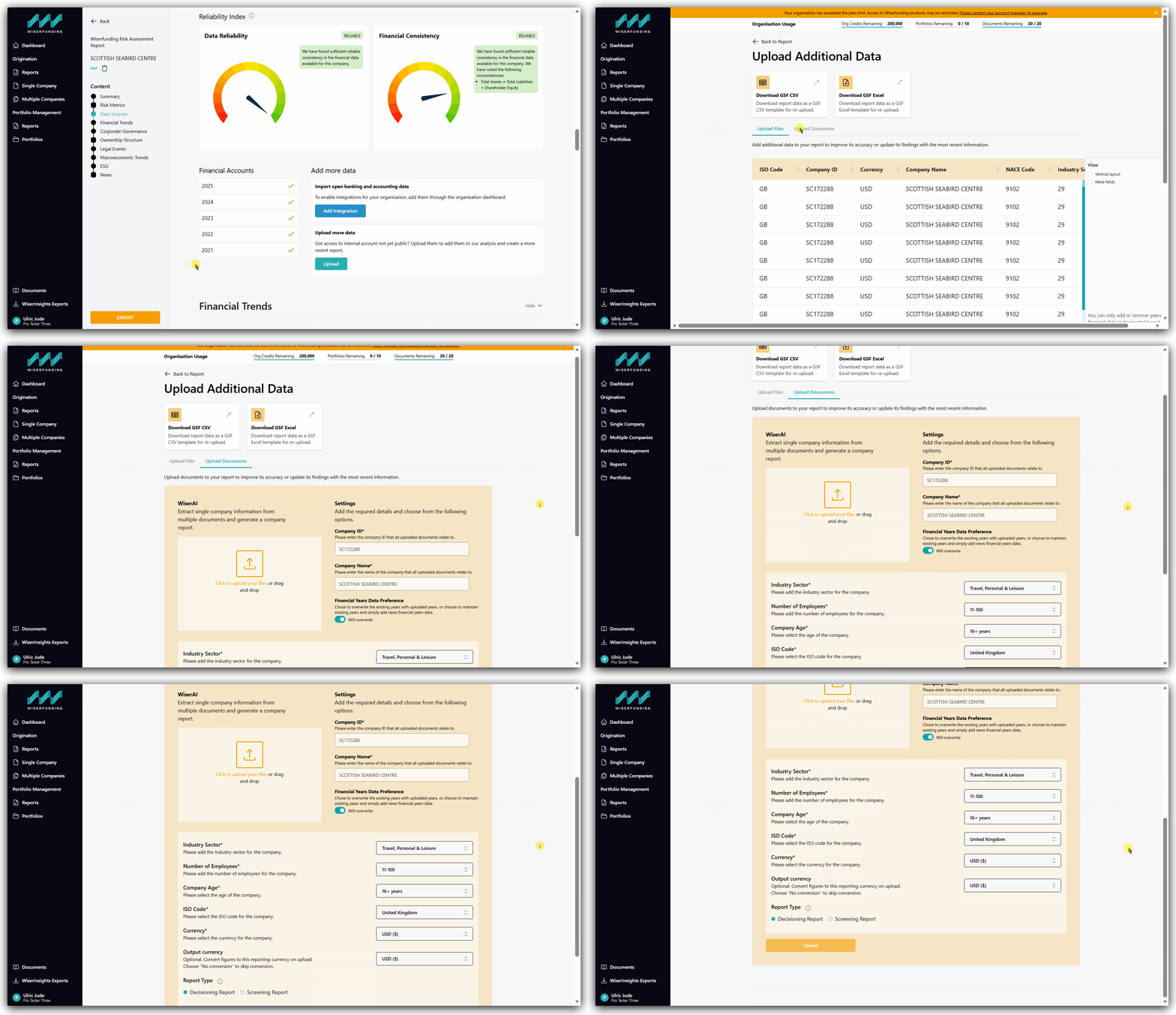
Once processing is complete, a new report will be generated incorporating the financial information extracted from your uploaded documents.
When using this workflow, the newly generated report will retain the Wiserfunding-sourced information from the original report while also incorporating the financial data extracted from your uploaded documents.
Generate a Report from Uploaded Documents Only
Use this workflow when you want to create a report using only the financial information contained within your uploaded documents.
Steps
- Navigate to the Single Company page.
- Select the Document Upload tab.
- Drag and drop your files into the upload area.
- Complete any additional information requested.
- Click Upload.
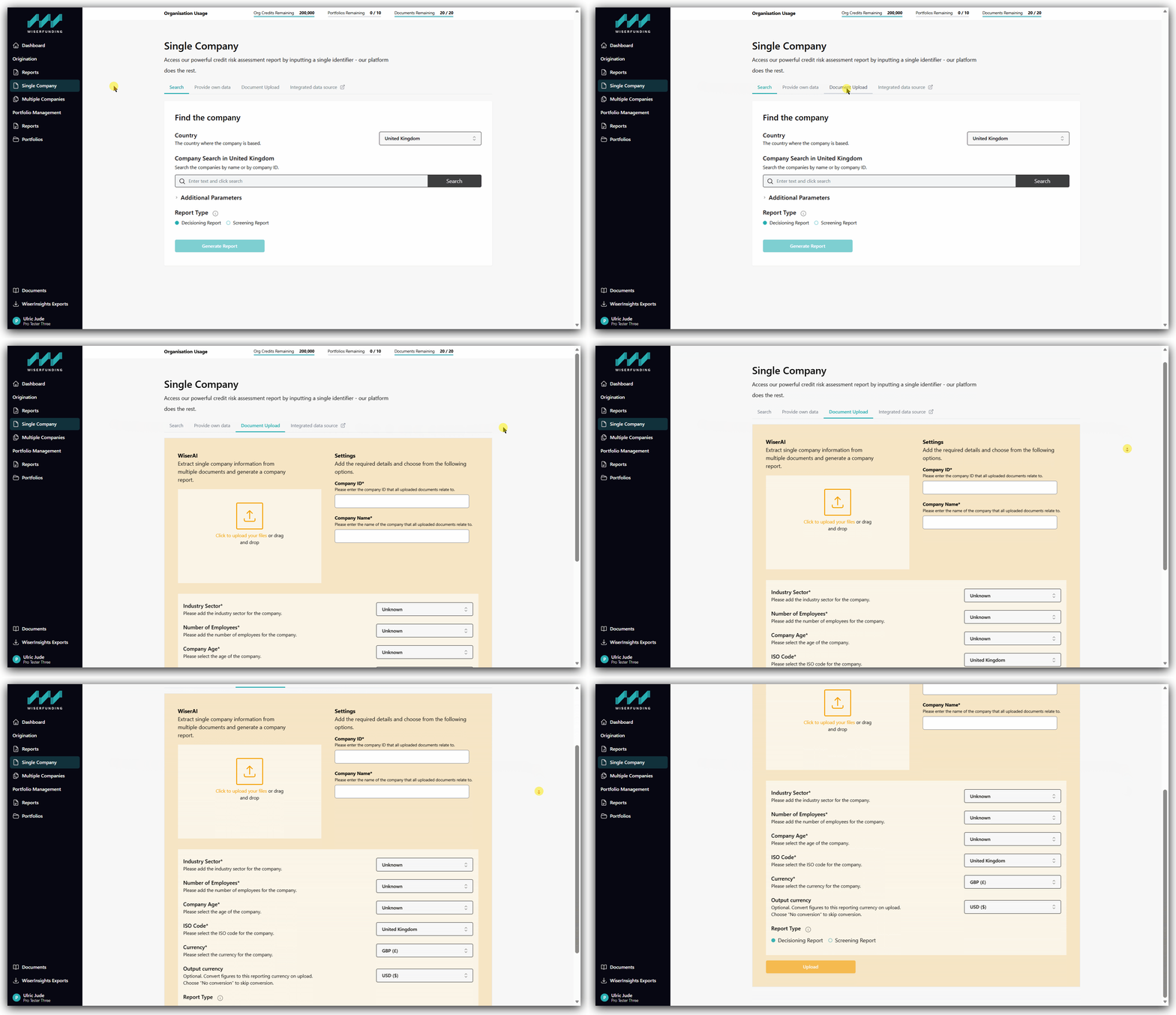
Once processing is complete, a new report will be generated using the financial data extracted from your uploaded documents.
When using this workflow, the report will be based solely on the information contained in the uploaded documents. Wiserfunding-sourced company data will not be included.
Best Practices
To achieve the best extraction results:
- Upload clear, high-quality files whenever possible.
- Ensure documents are complete and not missing pages.
- Use documents that contain financial statements and supporting financial information.
- Review the generated report after processing to confirm the extracted information is accurate.
Where possible, upload only the pages containing financial statements and related financial data. Summary sections, company overviews, and other non-financial content typically do not improve the extraction results and may increase processing time and AI usage.
Processing times may vary depending on document size, complexity, and the number of documents uploaded.
If you have any further questions or face any issues, please contact our support team.