---
title: How do I run multiple companies using the automated data sourcing?
description: This article outlines how to run multiple company risk assessment in a batch using the automated data sourcing
image: https://knowledge.wiserfunding.com/hubfs/Wiserfunding%20Logo%20-01%20(3).png
---
[Skip to content](https://knowledge.wiserfunding.com/run-multiple-companies-wf-sourced-data#main-content)
English
Show submenu for translations
[File a support ticket](https://knowledge.wiserfunding.com/kb-tickets/new?hsLang=en)
![Logo\_Wiserfunding Logo -01-2.png\]](https://knowledge.wiserfunding.com/hs-fs/hubfs/Logo_Wiserfunding%20Logo%20-01-2.png?height=50&name=Logo_Wiserfunding%20Logo%20-01-2.png)
Open main navigation
Close main navigation
- English
Show submenu for translations
- [File a support ticket](https://knowledge.wiserfunding.com/kb-tickets/new)
- wiserfunding.com
wiserfunding.com
Hello. How can we help you?
- There are no suggestions because the search field is empty.
1. [Help Centre](https://knowledge.wiserfunding.com/?hsLang=en)
2. [Using the Wiserfunding Platform](https://knowledge.wiserfunding.com/using-the-wiserfunding-platform?hsLang=en)
3. [Running New Reports](https://knowledge.wiserfunding.com/using-the-wiserfunding-platform?hsLang=en#running-new-reports)
# How do I run multiple companies using the automated data sourcing?
## This article outlines how to run multiple company risk assessment in a batch using the automated data sourcing
To run multiple companies using the automated data sourcing you will need to populate a CSV template with the following fields:
- ISO\_Code: Being the country the company is located in
(e.g. GB = UK, DE = Germany, IE = Ireland, etc.)
- Company\_ID: Being the company registration, identification or serial number
A full list of ISO\_Codes can be found **[here](https://knowledge.wiserfunding.com/how-do-i-know-what-iso-code-to-use?hsLang=en)**
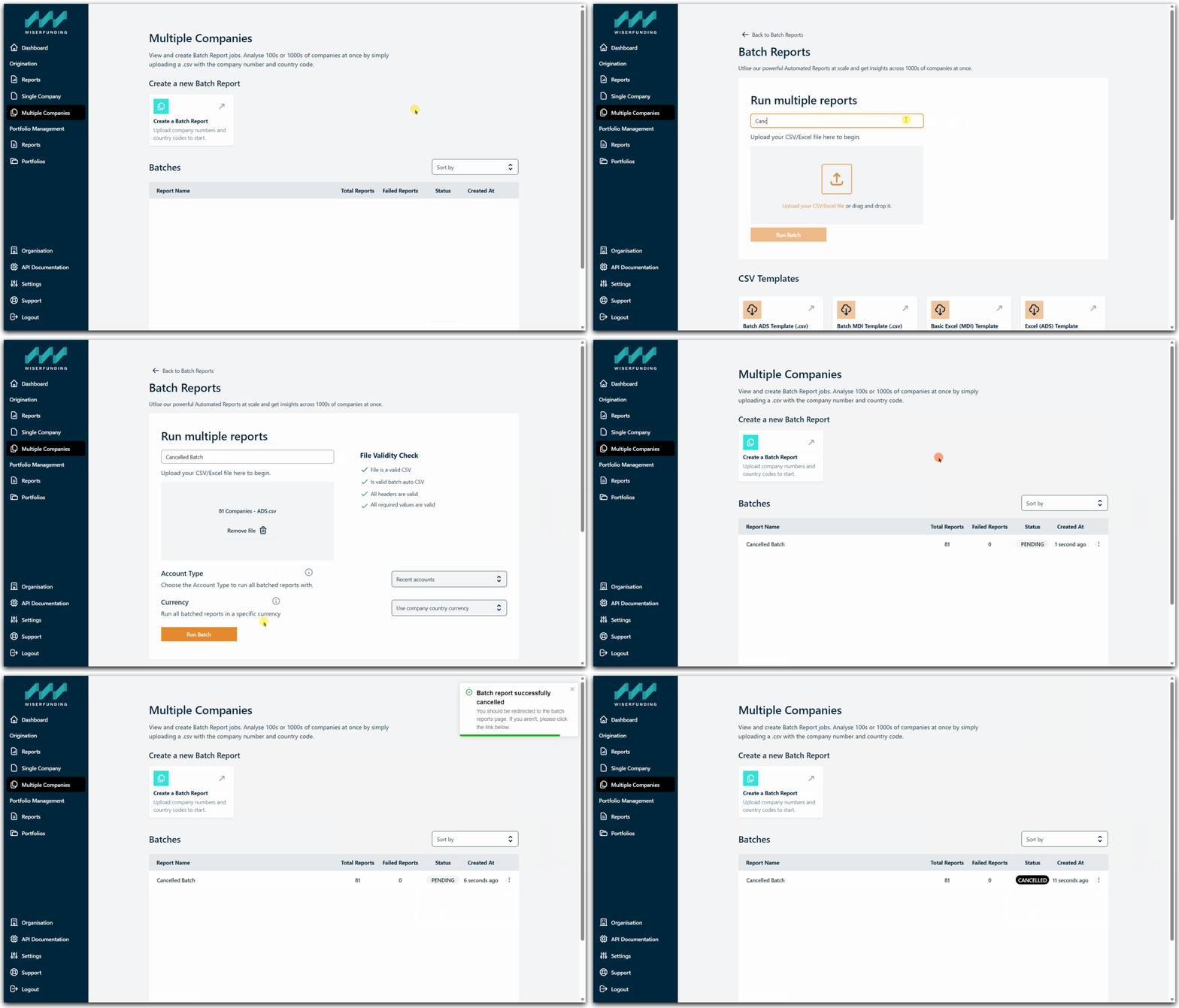
To run multiple companies in a batch simply:
- Select '**Multiple Companies**' from the left hand panel - this is where you will find any batches in progress or completed in the past
- Select '**Create a Batch Report**'
- Select '**Upload your CSV**'
*(a CSV template is available to populate if required: 'Batch ADS Template \[.csv\]')*
- Navigate to where your CSV file is located and select '**Open**'
- The platform will check whether the CSV file is valid
*(any issues will be displayed in the right of the upload manager)*
- Select '**Run Batch**'
Your batch will run in the background and you will receive an email once the batch has been completed.
**To cancel a batch report:**
- Click on the Ellipsis button, and
- Select the 'Cancel' button.
This will cancel the batch and end the process before it is completed.
---
If you have any further questions or face any issues, [please contact our support team.](https://knowledge.wiserfunding.com/get-more-help?hsLang=en)
- [Using the Wiserfunding Platform](https://knowledge.wiserfunding.com/using-the-wiserfunding-platform?hsLang=en#main-content)
- [Running New Reports](https://knowledge.wiserfunding.com/using-the-wiserfunding-platform?hsLang=en#running-new-reports)
- [Updating Reports | Adding More Data](https://knowledge.wiserfunding.com/using-the-wiserfunding-platform?hsLang=en#updating-reports-adding-more-data)
- [WiserAI Documents](https://knowledge.wiserfunding.com/using-the-wiserfunding-platform?hsLang=en#wiserai-documents)
- [Portfolio Management](https://knowledge.wiserfunding.com/using-the-wiserfunding-platform?hsLang=en#portfolio-management)
- [Using Wiserfunding APIs](https://knowledge.wiserfunding.com/using-the-wiserfunding-platform?hsLang=en#using-wiserfunding-apis)
- [Integrations](https://knowledge.wiserfunding.com/using-the-wiserfunding-platform?hsLang=en#integrations)
- [General](https://knowledge.wiserfunding.com/using-the-wiserfunding-platform?hsLang=en#general)
- [Understanding the Credit Insights](https://knowledge.wiserfunding.com/understanding-the-credit-insights?hsLang=en)
- [Create Users | Passwords | Contact Support](https://knowledge.wiserfunding.com/create-users-passwords-contact-support?hsLang=en#main-content)
- [Contact Support](https://knowledge.wiserfunding.com/create-users-passwords-contact-support?hsLang=en#contact-support)
- [Admin](https://knowledge.wiserfunding.com/create-users-passwords-contact-support?hsLang=en#admin)
- [Platform Release Notes](https://knowledge.wiserfunding.com/platform-release-notes?hsLang=en#main-content)
- [API Versioning Policy](https://knowledge.wiserfunding.com/platform-release-notes?hsLang=en#api-versioning-policy)
[](http://wiserfunding.com?hsLang=en)
Copyright © 2026, Wiserfunding Ltd